For a restaurant, a website is more than a place to show food photos. Customers may visit your store to check the menu, learn about your restaurant, view special offers, find your location, or place an order.
Choosing the right shopify restaurant theme can make these tasks easier. A clean design, simple navigation, strong product images, and mobile-friendly pages can help customers find what they need without confusion.
In this guide, we will cover 5 easy ways to build a better restaurant store on Shopify and create a simple experience for your customers.
Table of Contents
Why Choose a Shopify Restaurant Theme?
A restaurant needs a different type of online store experience compared with a regular ecommerce business. Food images, menus, prices, categories, locations, and ordering information should be easy to find.
A good shopify restaurant theme can help you organize these elements in a way that looks professional and remains easy to use.
The goal is simple: help visitors understand your restaurant quickly and make it easy for them to take the next step.
5 Easy Ways to Build a Better Restaurant Store
1. Create a Clean and Simple Homepage
Your homepage is often the first page customers see. It should quickly explain what your restaurant offers.
Start with a strong food image, restaurant name, short introduction, and a clear button for an important action such as viewing the menu or ordering online.
Avoid adding too much information above the fold. Customers should be able to understand the main purpose of your website within a few seconds.
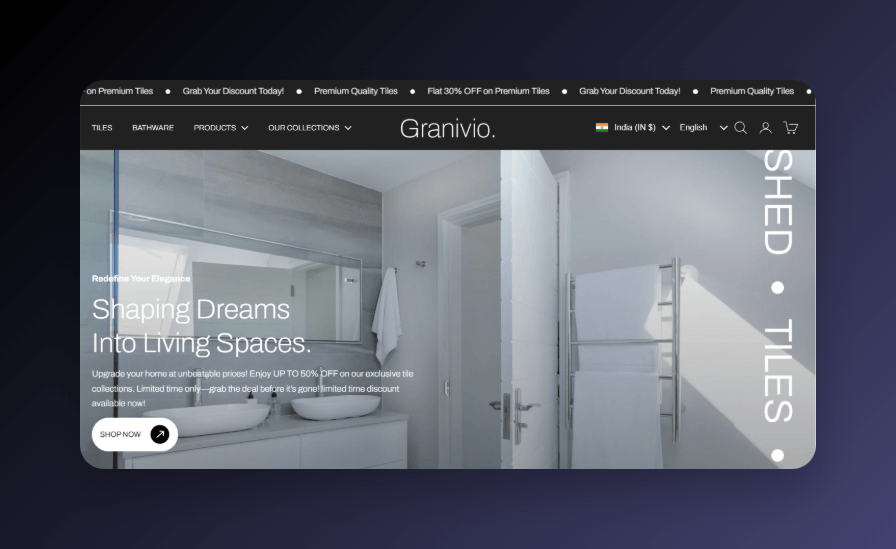
A clean shopify restaurant theme can help you create a homepage that looks attractive without making navigation difficult.
2. Show Food With High-Quality Images
Food photography can have a big impact on an online restaurant store. Customers often decide what they want based on how a dish looks.
Use clear images that show the food from a useful angle. Keep image quality consistent across your menu and product pages.
For each food item, include a simple name, short description, price, and other useful information.
If you sell different sizes, flavors, or options, make those choices easy to understand.
3. Make Your Menu Easy to Browse
A restaurant menu should not feel complicated. Organize dishes into clear categories such as starters, main dishes, desserts, drinks, or other categories that match your business.
Customers should be able to move from one category to another without searching through a long page.
Use short descriptions and highlight important information such as vegetarian options, popular dishes, or special items when useful.
A well-planned shopify restaurant theme can help you present your menu in a structured way and make food discovery easier.
4. Make Mobile Shopping Easy
Many customers will visit your restaurant website from a smartphone. Your store should therefore work well on smaller screens.
Check that text is easy to read, images load properly, buttons are easy to tap, and menu categories are simple to navigate.
Ordering information should also be easy to find on mobile devices.
Before publishing your store, test the complete customer journey on a phone. Make sure customers can browse the menu and find important information without zooming or excessive scrolling.
5. Highlight Important Restaurant Information
Customers often need more than just a menu. They may want to know your opening hours, location, contact details, delivery information, pickup options, or special offers.
Place this information where customers can find it easily.
You can also add a dedicated contact or location section and make important information visible in the footer.
A good shopify restaurant theme should make it easy to organize these details without making the website feel crowded.
What Features Should a Restaurant Theme Have?
When choosing a theme, focus on features that support your restaurant’s actual needs.
- Mobile-friendly design
- Clean navigation
- Large product images
- Easy menu organization
- Customizable sections
- Clear product information
- Fast and simple shopping experience
- Space for restaurant information
You do not need every possible feature. Choose the features that help your customers browse and order more easily.
Consider Granivio for Your Restaurant Store
Granivio is a Shopify theme option that merchants can explore when building an ecommerce store. Its flexible layout can be customized for different types of businesses and product catalogs.
You can explore the Granivio Shopify theme and review its current design and available features before deciding whether it fits your restaurant website.
While choosing a shopify restaurant theme, compare the theme’s layout, customization options, mobile experience, and overall design with your restaurant’s requirements.
Make Your Restaurant Store Easy to Trust
A professional website can help customers feel more comfortable when they are deciding whether to order.
Use real food photos, clear prices, accurate descriptions, and easy-to-find contact information. Avoid using confusing product names or hiding important details.
You can also add customer reviews or other trust-building information if it is relevant to your business.
Simple and honest information can create a better experience than a website filled with unnecessary design elements.
Keep Your Store Design Consistent
Your restaurant website should have a consistent visual style. Use similar image sizes, clear headings, readable fonts, and a simple color structure.
Your logo, food photos, menu, buttons, and other sections should feel like they belong to the same brand.
This consistency can make your store look more professional and easier to recognize.
Improve Your Restaurant Store Navigation
Good navigation helps customers find important pages quickly.
Your main menu can include sections such as Home, Menu, About, Contact, Location, and other pages that your restaurant needs.
Do not add too many menu items. Keep the most important pages visible and place less important information in the footer.
A simple navigation system is one of the most useful parts of a shopify restaurant theme because customers should not have to search for basic information.
Use Shopify Apps When You Need Extra Features
Your theme provides the basic design and layout, but apps can add extra functionality to your store.
The Xuuro Shopify Apps collection includes different Shopify solutions that merchants can explore for their stores.
Only install apps that solve a real problem for your business. Too many apps can make your store harder to manage and may affect the overall customer experience.
Simple Tips for a Better Restaurant Website
- Use clear food photos.
- Keep menu categories simple.
- Show prices clearly.
- Make ordering information easy to find.
- Test your website on mobile.
- Keep important contact details visible.
- Use simple product descriptions.
- Remove unnecessary sections.
These small improvements can make your restaurant website easier to use and more comfortable for customers.
How to Choose the Right Theme
Before selecting a shopify restaurant theme, think about what your customers need most.
Ask yourself whether the theme makes it easy to show your menu, display food images, explain your restaurant, and guide customers toward ordering or contacting you.
Also check whether the theme works well on mobile devices and gives you enough customization options for your brand.
A theme should support your business instead of forcing your restaurant to change the way it presents its products.
More Shopify Resources
If you want simple guides about Shopify themes, apps, ecommerce, and store growth, visit ShopifyLearner.
You can also explore different Shopify tools and solutions through the Xuuro partner collection to find options that may fit your store.
Frequently Asked Questions
Can Shopify be used for a restaurant?
Yes. Shopify can be used to create an online restaurant store where you can present products, menus, pricing, and other business information.
What should a restaurant Shopify theme include?
A good theme should provide a mobile-friendly design, simple navigation, attractive product images, clear menu organization, and flexible sections for restaurant information.
Is Granivio suitable for a restaurant store?
Granivio is a flexible Shopify theme that merchants can explore for different ecommerce businesses. Check its current features and design to see whether it matches your restaurant’s needs.
Why are food images important?
Customers cannot physically see the food before ordering online, so clear and attractive images can help them understand what they are considering.
Should a restaurant website be mobile-friendly?
Yes. Customers may browse menus and restaurant information from smartphones, so your website should be easy to use on smaller screens.
Conclusion
Choosing the right shopify restaurant theme can help you build a cleaner and more useful online store. The most important areas are simple navigation, strong food images, an easy-to-browse menu, mobile-friendly design, and clear restaurant information.
Start by focusing on what your customers need most. Make your menu easy to understand, show your food clearly, and make important information simple to find.
You can also check out Granivio as one theme option and compare it with your restaurant’s design and functionality needs.
A simple, clear, and customer-friendly store can help your restaurant create a better online presence and make it easier for visitors to take the next step.